
Remove music from a video
Have a video with music under someone talking? Choose it in MusicWipe, hear the first 30 seconds with the music reduced, then decide whether to clean the full video. You can adjust how much background sound to include. Results vary, so listen before exporting.
Opens the web app for a free 30-second preview. No account needed; up to 20 previews a day. Only the audio is uploaded.
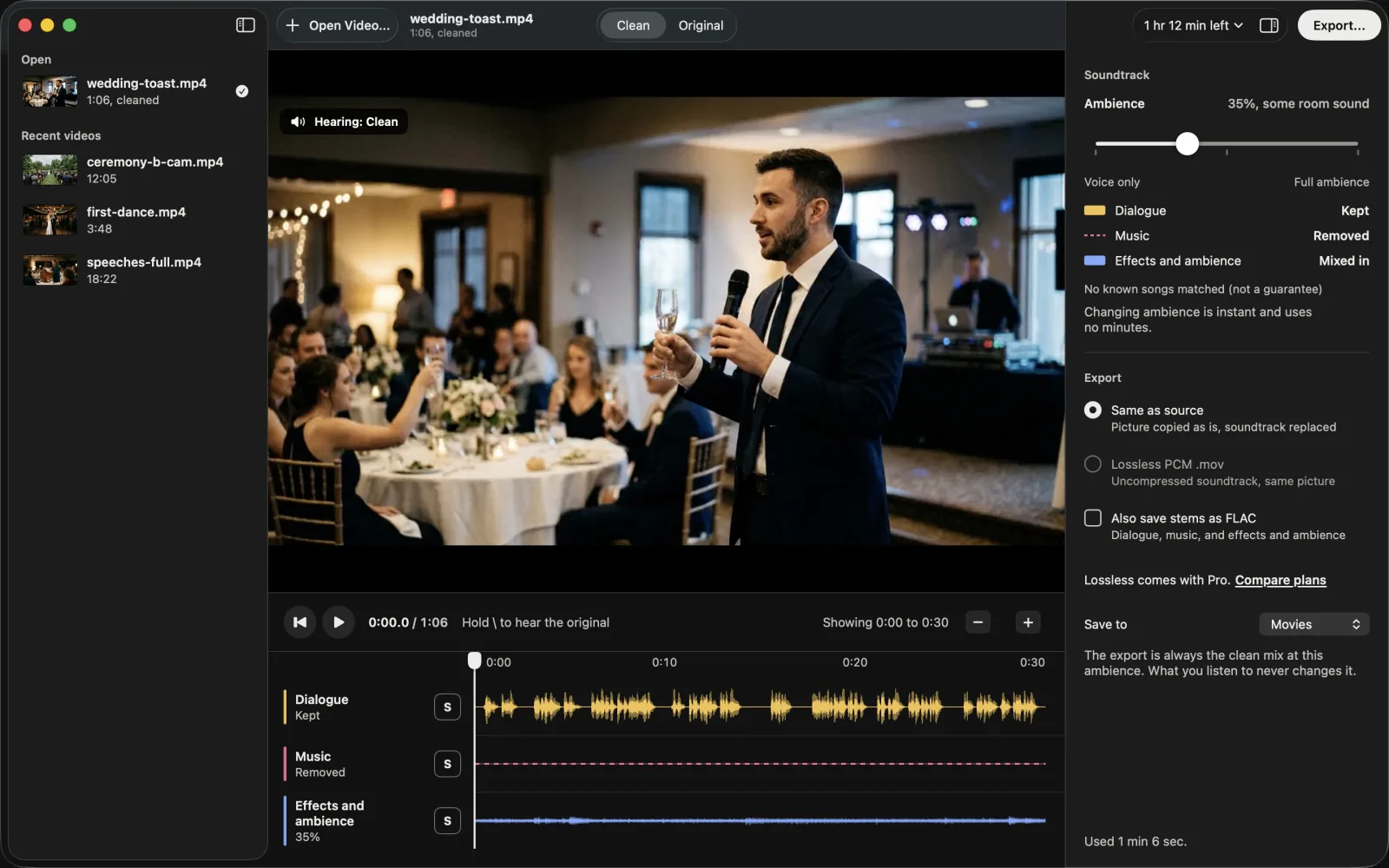
- Dialogue: kept
-
Music:
removed - Effects and ambience: kept
Demo: a toast with a DJ playing
A clip we made for testing: a text-to-speech voice with generated music and room sound, so we can publish every part of it. The two MusicWipe versions are the production model’s output, not edited.
Original
Speech, music and room sound
MusicWipe, Ambience 60%
Dialogue and some room sound; compare with the original
MusicWipe, Voice only
Ambience at 0
Transcript
Good evening, everyone. For those who don't know me, I'm James. I've been Michael's best friend since we were eleven years old. Back then, he promised me he would never, ever get married.
Then he met Emily. I remember the night he called me after their first date. He talked for two hours, and I don't think he took a breath. Emily, you make him kinder, braver, and a lot better dressed.
Demo: a cooking video with a guitar bed
Another synthetic test clip: a text-to-speech voice with generated guitar and kitchen sounds. The guitar is reduced, but much of the chopping and sizzle goes with it. Compare the original, the cleaned mix and what the model removed.
Original
Voice, guitar and kitchen sounds
MusicWipe, Ambience 50%
Music reduced; some kitchen sounds lost
What was removed
The music track
Transcript
Okay, so today we're making my favorite weeknight stir fry. It's the one I make when I get home late and I'm starving.
I've got chicken thighs, two peppers, and a whole red onion. The onion's already chopped, so let's do the peppers. Cut them into strips about as wide as your finger.
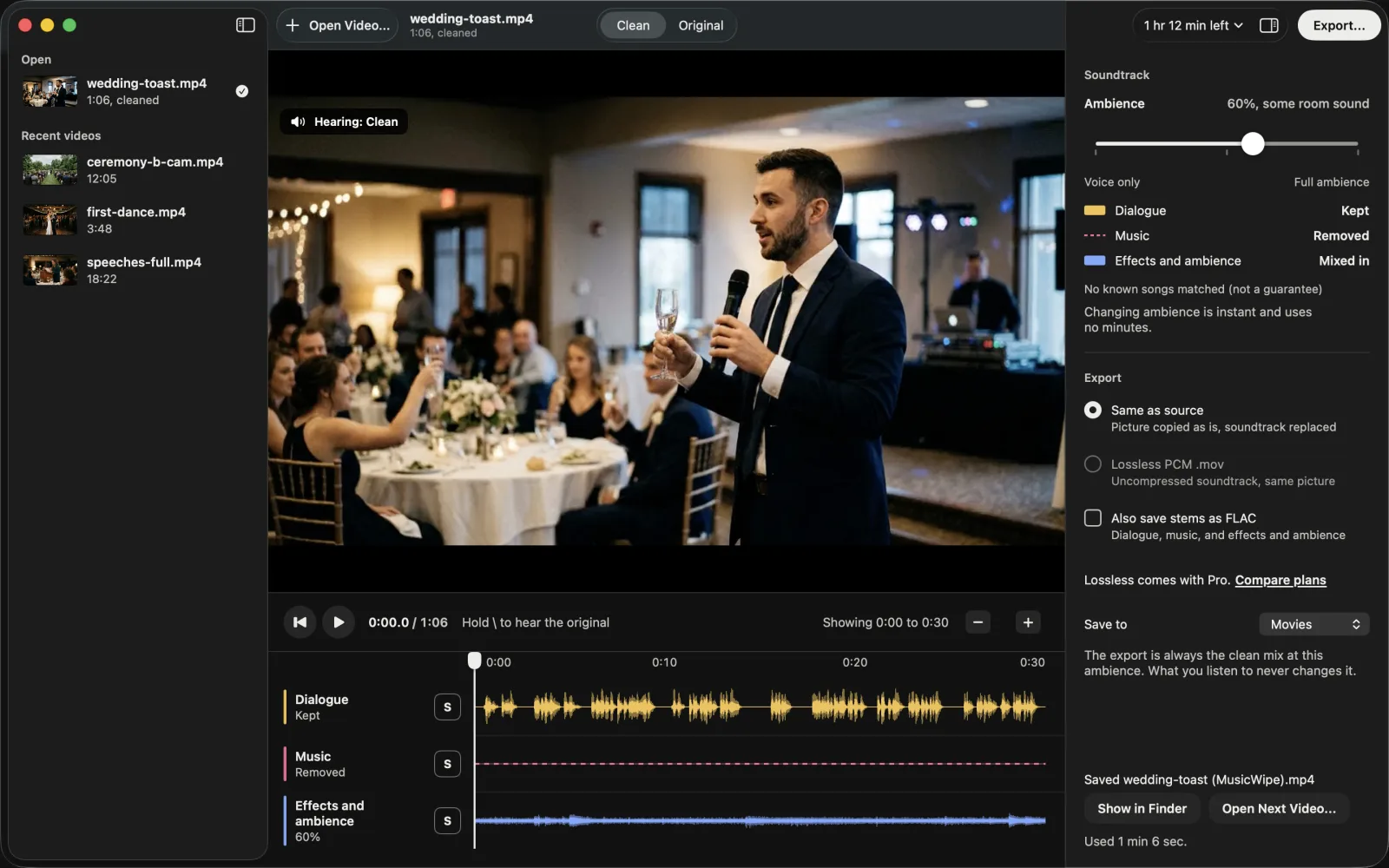
The toast in MusicWipe
These are from the Mac app, which has the same lanes, slider and export options as the web app.
Remove music while keeping speech
- Choose a video. MusicWipe extracts its soundtrack on your device and uploads the first 30 seconds of audio for a free preview. The picture stays on your device.
- Compare the original and cleaned sound. Listen to the speech and check for leftover music or missing sounds. Move Ambience toward Voice only for less background sound, or toward Full ambience to include more of the effects track. Changing the mix does not use another preview.
- Clean and save the full video if the preview works for you. MusicWipe replaces the soundtrack and copies the picture without re-encoding it. The full clean uses minutes; the button shows the cost before you start.
What you get back
The same video in the format you opened (MP4, MOV, M4V, MKV or WebM), with a new soundtrack. The picture is copied without re-encoding. If you choose lossless audio, the export uses MOV. This is the synthetic toast from the listening demo above after MusicWipe:
Read the speech transcript for this video
Good evening, everyone. For those who don't know me, I'm James. I've been Michael's best friend since we were eleven years old. Back then, he promised me he would never, ever get married.
Then he met Emily. I remember the night he called me after their first date. He talked for two hours, and I don't think he took a breath. Emily, you make him kinder, braver, and a lot better dressed.
MusicWipe separates the soundtrack into dialogue, music, and effects and ambience. It builds the replacement soundtrack from the dialogue plus the amount of effects and ambience you choose. This can retain room sound, but it cannot guarantee that every effect survives. In the second synthetic demo above, much of the chopping and sizzle is removed with the guitar.
Keep the room sound, or don’t
The Ambience slider decides how much of the effects and ambience track goes back in, from Voice only to Full ambience. In the toast demo, the second and third players use the same separation with only that slider moved.
For interviews and voice-overs, try a low setting if speech is what matters most. For footage where the surroundings matter, compare higher settings against the original. A higher setting may bring back some music along with the room sound. Moving the slider happens on your device and never uses minutes.
Save the separate tracks
To finish in an editor instead, tick Also save stems as FLAC when you export. You get three lossless files, dialogue, music, and effects and ambience, each the same length as the soundtrack, so they line up at zero. The most common use is laying a track you’re licensed to use under the original dialogue and effects.
Where it struggles
Separation is harder when music is louder than the voices, when someone is singing, or when audio has been compressed many times. Music can remain, and wanted sounds can be removed. The cooking demo above shows the latter. Use the free preview to check your own footage before using minutes on a full clean. Full videos are billed by the second.
No tool can promise a platform won’t flag a video, and removing a song doesn’t change who owns the footage. With Pro, the copyright check tells you which known songs were in the original and whether each one is still detectable after cleaning.
How we tested it
On September 26, 2026 we ran the model MusicWipe uses (checkpoint bandit_v2_real1, stereo processing, as in production) on our own test set: 95 one-minute clips, each a commercial song mixed 3 to 12 dB under dialogue and sound effects from the DnR dataset. The songs are by artists we kept out of training entirely.
- Music left behind: the median was 17.05 dB below the original music, so what’s left is about 17 dB quieter.
- Dialogue: the median signal-to-distortion ratio of the dialogue track was 16.24 dB. In plain terms, the speech that comes out is close to the speech that went in, with errors about 16 dB quieter than the voice.
- Could a song matcher still find the song? We ran audfprint, an open-source audio fingerprinting tool, against the 95 songs. It identified the song in 87 of the 95 original mixes, in 3 of the 95 cleaned soundtracks, and in none of the 95 true dialogue tracks.
This is our own evaluation, not an independent benchmark, and audfprint is not the matcher YouTube, Instagram or TikTok use.
Questions people ask
Is it free?
The previews are. You get up to 20 free previews a day without an account, each covering the first 30 seconds of a video. Signing in with Apple or Google adds 10 free minutes for full videos, once per person. After that, a 60-minute top-up is $7.99, or $4.99 with a plan, and never expires, or Creator is $9.99 a month for 120 minutes.
Does it work on my phone?
The web app runs in Safari on iPhone and iPad, and previews work there. Exporting is limited by how much memory and storage Safari gives a web page, so videos longer than roughly 10 to 15 minutes may not export on a phone. That's our estimate; we haven't measured it on every device. The MusicWipe app for Android is available now on Google Play, and so is the Mac app from this site. MusicWipe for iPhone and iPad is coming soon.
Can it split a song into vocals and instruments?
No. MusicWipe treats a whole song, singing included, as music, and separates it from the speech and sound effects around it. For karaoke or remix stems, use a music stem splitter.
Try it on your own video
The first 30 seconds are free, with no account. Only the audio leaves your computer.
Only process footage you have the rights to use. No tool can guarantee a video won't receive a copyright claim.